The YMCA Fitness App
Our mobile app puts all the tools you need for a healthier lifestyle right in the palm of your hand. You can:
- Scan into a branch using the app or add your membership card to your Apple Wallet
- Find group exercise classes
- Reserve a space in a group fitness class
- Track your workouts
- Participate in fitness challenges
- Receive notifications, such as schedule changes, inclement weather and facility updates
Access
All YMCA members must log in with the username and password used to purchase their YMCA membership, or programs such as personal training, summer day camp or swim lessons.
Unsure what your username and password are? Please reach out to YMCA Customer Success Center via email or phone at 919-719-9989.
Teens ages 11-17 may access the mobile app with parental permission. However, they must first complete a teen equipment orientation.
Booking Classes
To accommodate all YMCA members, group fitness classes require reservations. Members can book classes through our mobile app or website.
Reservations open 46 hours before each bookable session start time and are available until class starts or until all spaces are filled. If you cannot attend a previously reserved time or class, please cancel your booking.

Downloading the App
Our app is designed to be your all-in-one solution to staying connected to your goals and the YMCA community. Whether you're managing your schedule or staying on track with your wellness goals, the YMCA app makes it simple.
Schedules & Reservations
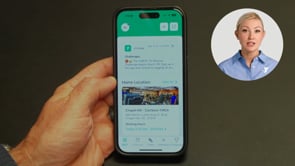
Using the YMCA fitness app, you can view facility schedules and book fitness class reservations. To see the schedule, simply navigate to the app's home page. Scroll down to find group fitness, gym and pool schedules (if applicable), and tap on any of the buttons to see those schedules.
Tracking Workouts
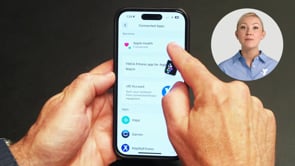
You can add workouts manually or simply connect your fitness tracker of choice to the app to automatically track your workouts.
Virtual Classes & Wellness Challenges
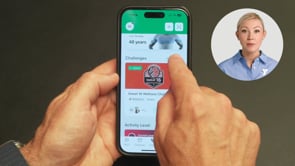
Looking for ways to stay motivated and active? You can access virtual classes taught by our instructors or Les Mills classes right from our app.
Plus, you can join YMCA Wellness Challenges throughout the year, and track your progress right in the app.
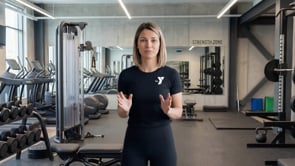
Pathways
Instructions on how to access and use our on-demand fitness series, Pathways, to tailor a workout experience to your fitness levels and goals.
Fitness Class Check-in Questions
Members will check-in to fitness classes using kiosks outside each studio and pool area. This ensures classes are not overcrowded and everyone who has booked a space has one.
Member check-in will open 30 minutes before class start time.
First, refresh the check-in screen. If that does not resolve the issue, check with YMCA staff or the instructor and show the confirmation email for the class booking. If you do not have an email confirmation, please wait until the class starts and join if there are any spaces available.
Class check-in will close at the start of the class. This is to ensure the class starts on time and there are no disruptions to the class experience. You may enter the class late only with YMCA instructor or staff approval.
No. Members may only check in themselves. If you are found checking others in for class, the YMCA may restrict your ability to book and attend further classes.
Class check-in will close at the start of the class. If the class still has space, you can enter the studio with approval of the instructor or other YMCA staff.
Members can cancel reservations by following the instructions in their confirmation email or through the app under the “My Bookings” tile. Please cancel classes within two hours of the class start time to allow others on the waitlist to join.
Fitness Class Attendance Policy
The YMCA has an attendance policy to improve fairness and access to group fitness classes.
The YMCA's attendance policy for all group fitness classes will improve fairness and access to group fitness classes.
Members will incur a temporary 14-day pause on making class reservations if they cancel within two hours of a class (late cancel) five times or miss a class five times within 30 days.
Canceling a class reservation within two hours of the class start time.
A missed class may include:
- Attending but not checking in at the kiosk
- Forgetting to cancel and not attending
Late cancellations and missed classes are tracked over a rolling 30‑day period.
If a member records five instances within 30 days, a temporary 14‑day pause will be placed on their ability to reserve group fitness classes. This pause helps open spots for other members and automatically lifts after 14 days.
If a member is moved off a waitlist within two hours of the class start time and is unable to attend, the late cancel will not be held against them.
Pilates Reformer classes have very small class sizes and limited equipment. Cancellations must be made at least 24 hours in advance to avoid being charged.
No-shows will result in a session deduction or strike.
Need Help?
Unsure of your username and password?
Please reach out to the YMCA Customer Success Center.